
Why do you want to design your own Android or iPhone application? Is it because you want to follow the trend of entrepreneurs and business owners who have created applications? Or because you have identified a problem that you believe you can solve through your own application?
The answer to this question will determine whether your application has a chance of succeeding.
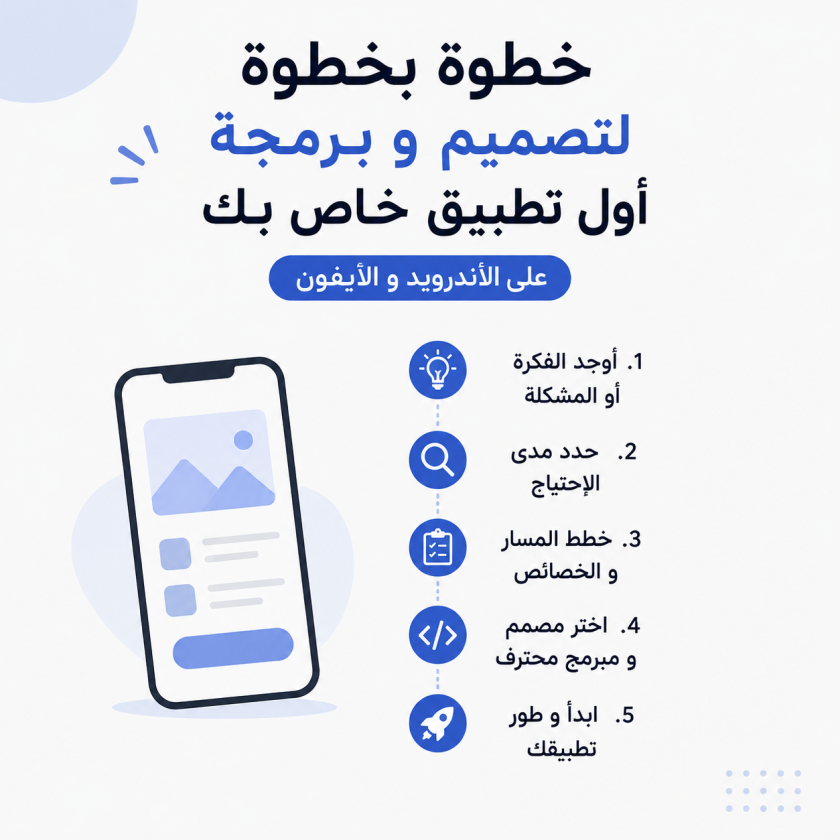
Here are some steps to help you get started with designing your application. Keep in mind that they will not work equally well for every person or every application, but you can consider them useful guidelines.
These steps are based on our experience working with entrepreneurs to help them design and market their applications for smartphones and tablets.
Take whatever works for you when designing your application and developing your strategy, or follow all of these steps. The important thing is to get started.
If you already have an idea for your application, move on to the second step.
If you do not, read this section. Do you want to create your own application but do not have an idea?
What you really need to look for are problems—and there are plenty of them around you!
Successful entrepreneurs solve problems in ways that we often cannot imagine.
If you look around you, every product or service you use was created to solve a particular problem.
If you want to move from one place to another more quickly, a car may be the most suitable solution.
If you want to travel from one country to another faster, you can use an airplane.
So, look at the problems you encounter in your daily life. Think about each one and write them down in a list.
Once you have a comprehensive list, start thinking about how you could solve these problems and choose the solutions that can be implemented most easily.
Read also:
Why Starting Small Leads to Better App Development
Studying the level of demand for your application idea is one of the best ways to determine whether there is a real need for it.
You can research how much people need your idea by using Google’s well-known Google Keyword Planner, which shows the search volume and types of keywords people use within the field in which you plan to develop your application.
You can also create a landing page that briefly explains your application idea and asks people who are interested in it to register their email addresses for your mailing list.
Studying and documenting your application idea means that you have something people can see and understand.
Now it is time to turn the details of your application into documentation.
If you want to make the concept look more professional, create a visual representation of your application’s interface, screens, tools, and expected user scenarios. This is known as wireframing.
When putting your idea on paper, remember to document as many details as possible.
Explain the paths users will take while using your application and moving between its different screens. Also, describe the features and functionality the application will include.
This step will help the developer responsible for designing and developing your application clearly understand your expectations and requirements.
Read also:
The Difference Between Different Types of Applications in Terms of Development, Cost, and Time
Using the document you prepared earlier, which contains your application’s features and the user flows between its screens, review it carefully and identify the features you can remove.
Focus only on the essential features that serve the core idea of your application. Do not include unnecessary features in the first version simply because they would be nice to have.
You can add those features later through future updates. This can reduce your development costs and make marketing your application easier and faster.
It is common for many entrepreneurs to want to create an application with a simple, basic design while focusing most of their attention on the development itself.
They are, of course, mistaken.
Design is not only about the appearance and colors of your application. It is much broader than that—it is closely related to the experience users have while interacting with your application.
As Vinod Khosla, founder of Khosla Ventures, said:
“Design is the way technology becomes useful.”
For this reason, choose a developer and designer who place user experience and graphic design (UX/UI) at the center of the application development process.
One option is to work with a professional iPhone and Android application design and development company that has an experienced graphic designer and a strong development team.
When choosing a company or individual, consider the following:
Look at their portfolio and review the applications they have developed. If you like the quality of their previous work, it is a good opportunity to work with a team capable of designing and developing your application professionally.
You should also make sure the company is serious and trustworthy by reviewing its social media presence or asking previous clients about their experience.
Design Your App Now:
View our portfolio and contact us to develop your Android (Galaxy) or iPhone (Apple) application
You should create developer accounts on major application stores, such as Google Play Store and Apple’s App Store, so that you can publish and sell your application or some of its content.
At the time this article was originally written, a Google Play developer account cost $25 per year, while an Apple developer account cost $99 per year. You can register as an individual or under a company name if you already have a business.
Analytics can help you understand your application’s performance, including the number of downloads, download timing, user demographics, user engagement, retention, and how effectively users interact with the application.
Consider using tools such as Flurry, which was available for free, as well as Localytics, which offered both paid and free versions.
Once your application is published on an app store and becomes available to users, the behavior, feedback, and opinions of your early users can become an important source of insights.
Their activity can provide statistics and information that guide you toward making improvements and adding new features.
Remember that updates and improvements are a constant part of the mobile application world. Therefore, continuously monitor the behavior of your mobile app users, collect their feedback, and keep improving your application.
Now that the first version of your application has been released with its essential features, you can start considering additional features.
Evaluate each new feature before adding it. Your analytics, observations, and user feedback will help you determine which features to prioritize and which ones are most relevant to your users.
These steps are not absolute rules. They are simply guidelines for designing an Android application, an iPhone application, a Windows Phone application, or any other custom mobile application.
In our view, and based on our experience, these are among the most effective steps to follow.
When you are ready to begin, remember that designing and developing an Android or iPhone application—or any other mobile application—is often the easiest part.
The biggest challenge is finding your customers, understanding their needs, and keeping them satisfied.
Adapted and translated.